Juggling multiple workstations across shared displays often leads to constant cable swapping, desk clutter, and video handshake delay. Tesmart targets this exact operational friction, offering multi-port hardware switches designed to route high-bandwidth video signals and USB peripherals through a single keyboard, mouse, and monitor array.
Shop at Tesmart through our affiliate link.
In this technical review, we evaluate four units across the lineup—ranging from high-refresh gaming docks to triple-display productivity stations. We will examine hardware benchmarks, switching latency, EDID stability, and documented customer support realties so you can determine if their hardware fits your workspace.
What Is Tesmart?
Founded to solve multi-system connectivity bottlenecks, Tesmart specializes in KVM switches, matrix routing hardware, and signal extenders for commercial IT desks, audio-video studios, and home offices. Rather than relying on software-based KVM solutions that cause network lag or latency, Tesmart emphasizes hardware-level switching with integrated EDID emulation and full display signal passthrough.
While their hardware specifications look exceptional on paper, prospective buyers should review post-purchase realities. Tesmart currently holds a 2.0/5 rating across 16+ verified reviews on Trustpilot. Reported pain points include delayed warranty turnaround, communication drop-offs on return claims, and firmware compatibility snags on select Mac Silicon setups. Understanding both the hardware capabilities and support limitations is critical before placing an order.
The Tesmart Difference — Hardware-Level Display Emulation
Many basic budget KVMs on the market use passive passthrough, causing your operating system to believe monitors have been disconnected every time you switch inputs. This scrambles application windows, shifts desktop layouts, and introduces an 8-to-12 second display negotiation lag. Tesmart utilizes hardware-level EDID (Extended Display Identification Data) emulators across its portfolio. This chip-level architecture continuously feeds handshake data to connected computers, keeping window arrangements locked and cutting input transition times down to approximately 2 to 3 seconds.
Refurbished Dual Monitor USB-C KVM Docking Station Kit — Clean Dual-Laptop Workflow

$251.99 $419.99
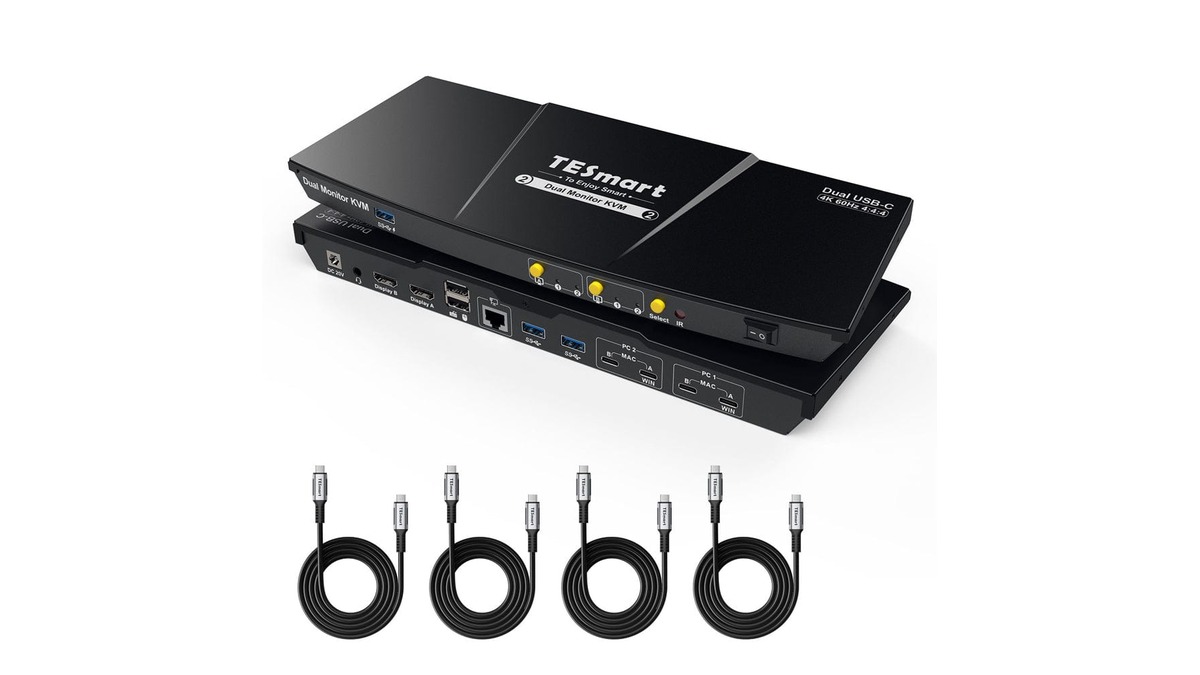
Streamline two modern port-limited laptops with Tesmart's Refurbished Dual Monitor USB-C KVM Docking Station Kit. The CKS202-P23 routes DisplayPort 1.2 video up to 4K at 60Hz across dual screens via a single USB-C connection per laptop, cutting the need for standalone docks and secondary power bricks.
The unit features integrated MST (Multi-Stream Transport) support for Windows, enabling native extended desktop "A-B-C" configurations. The extruded aluminum chassis dissipates heat effectively under sustained load, and switching triggers cleanly through hotkeys or front-panel pushbuttons. The practical drawback: standard base M1/M2/M3 MacBooks lack native MST across a single USB-C cable, causing macOS to mirror displays unless connected to a machine supporting dual independent streams natively. Dedicated keyboard and mouse USB passthrough can also be finicky with high-polling gaming peripherals.
Who Should Buy: Windows-centric remote workers managing an enterprise laptop alongside a personal PC requiring clean dual-display switching.
Who Should Skip: Base-model Apple Silicon MacBook users looking for plug-and-play dual extended monitors over one cable without extra hardware workarounds.
Made in Japan – HDMI 2.1 Dual 4K144Hz KVM Switch Gaming Dock — Zero-Compromise High-Refresh Routing

$499.00 $673.65
Power users demanding uncompromising frame rates will find a serious hardware solution in Tesmart's Made in Japan – HDMI 2.1 Dual 4K144Hz KVM Switch Gaming Dock. Built with an Analog Devices (ADI) video processing chipset, this switch pushes uncompressed 48Gbps bandwidth across dual displays at 4K 144Hz or 8K 60Hz.
It preserves gaming features including Variable Refresh Rate (VRR), Auto Low Latency Mode (ALLM), Fixed Rate Link (FRL), and Dynamic HDR. Signal integrity across short HDMI 2.1 runs remains pristine with zero measurable input lag added to the chain. The high cost is the trade-off here; at roughly $500 on sale, and requiring high-grade ultra-certified HDMI cables across every port, total installation costs run high. Cable length is unforgiving—runs over 6 feet (2 meters) without active signal boosting risk signal drops.
Who Should Buy: High-end PC gamers and creative professionals running Nvidia RTX 40-series or AMD RX 7000-series setups alongside a production rig on dual 144Hz OLED monitors.
Who Should Skip: General productivity users running standard 60Hz business monitors who do not require HDMI 2.1 throughput.
Refurbished 3 Port USB-C KVM Switch 4K60Hz — Triple-System Workstation Hub

$167.99 $279.99
The most budget-conscious path to multi-machine consolidation in the lineup is Tesmart's Refurbished 3 Port USB-C KVM Switch 4K60Hz. Model CKS301-E23 manages up to three USB-C hosts sharing one 4K@60Hz (4:4:4 chroma subsampling) display, a USB peripheral cluster, and an analog 3.5mm audio output.
Tesmart includes three full-featured Type-C cables directly in the box, avoiding the trial-and-error of finding third-party cables that support simultaneous DP alt-mode and USB 3.0 data. Switching between your test bench, daily laptop, and personal machine executes in approximately two seconds. Trade-off: it routes to only one single display. If you require dual or triple external monitor arrays, this hardware will not suffice. The dedicated keyboard/mouse emulation ports can also conflict with certain wireless dongles like Logitech Bolt without recent firmware updates.
Who Should Buy: Programmers, IT administrators, or students balancing a work laptop, homelab node, and personal laptop on a single widescreen monitor.
Who Should Skip: Users who require dual or triple display outputs across their workstations.
4 Port Triple Monitor KVM Switch HDMI 4K60Hz — Enterprise Command Center Control

$599.99 $809.99
For large-scale setups, Tesmart's 4 Port Triple Monitor KVM Switch HDMI 4K60Hz (HKS403-P24) is engineered to route four separate PCs across three dedicated 4K60 displays with one mouse and keyboard setup.
The unit features a front-facing USB 3.0 hub running at 5Gbps transfer rates, independent audio/mic jacks, RS232 and LAN control ports, and continuous EDID hardware passthrough. Desktop real estate remains preserved across all twelve video connections without desktop icon shifting. The primary drawback is back-panel cable congestion and system overhead. Hooking up four rigs across three screens requires twelve HDMI cables, four USB host cables, and substantial power wiring. Cable management requires heavy patience, and the rear chassis runs noticeably warm under full 24/7 load.
Who Should Buy: Financial day traders, network operations center (NOC) engineers, and multi-system developers managing four dedicated towers across a three-monitor cockpit.
Who Should Skip: Minimalists or laptop-only setups lacking multiple dedicated HDMI/DisplayPort outputs per machine.
Pricing & Purchasing Strategy
Tesmart products sit in the mid-to-premium bracket for hardware KVM solutions. Single-monitor USB-C units start around $167.99 for certified refurbished models, while advanced multi-monitor enterprise and gaming switches range between $250.00 and $600.00. While these price points represent savings compared to broadcast-grade matrix equipment, the documented Trustpilot issues regarding customer service and warranty resolution mean buyers should purchase strategically.
We strongly recommend completing checkout via PayPal or a top-tier credit card with purchase protection rather than standard debit cards. This guarantees an objective dispute avenue if you encounter hardware mismatches, non-responsive support tickets, or return complications within your 30-day trial window. To apply savings on tesmart.com, add your chosen unit to your cart, proceed to checkout, and insert any active seasonal promotion in the right-rail "Discount Code" field before completing payment.
Final Verdict
Tesmart manufactures high-capability hardware that solves difficult desk connectivity problems. Their inclusion of EDID emulation, 4K144Hz HDMI 2.1 bandwidth, and consolidated USB-C docking eliminates desktop clutter when properly matched to your machines. However, real-world customer service friction and occasional peripheral handshake quirks mean buyers should double-check laptop OS display limitations (specifically macOS MST limits) before checking out.
🍒 Shop Tesmart — Explore KVM Switches & Docks → tesmart.com